Monstrum (STEAM KEY) RU+CIS
Content: text (17 symbols)
Available: 6
Uploaded: 29.12.2024
Positive responses: 2
Negative responses: 0
Sold: 22
Refunds: 0
~ $1.9
The exact amount is on the payment page
Publication type: Steam Key / RU / UA / CIS
! This key can only be activated on a Steam account registered in Russia, Ukraine or CIS countries
Game language: English
Release date: May 20, 2015
Platform: Windows
Region: RU / UA / CIS (Russia, Ukraine and CIS countries)
Activation: Steam
======================================================
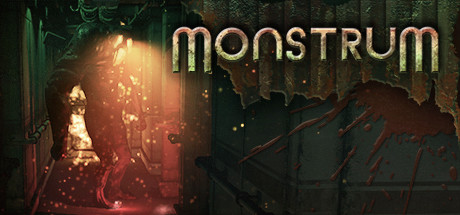
The creators of Monstrum took the usual recipe for creating survival horror games and did something completely new, adding procedural generation of levels, artificial intelligence-controlled predators and the absence of the ability to resurrect after death, so that players would not feel safe for a second on an abandoned cargo ship.
Monstrum will challenge even the most experienced gamers. In order to escape the chase or outplay your pursuer, you will have to rack your brains and use everything that comes to hand. Danger lurks around every corner. Try to stay alive and avoid the deadly creature. Are you up to the task of Monstrum?
• Three unique types of monsters
Meet three types of opponents, each with their own characteristics and tactics. Hide in cover or fight face to face? Will the same trick work twice?
• Unpredictable battlefield
The location of compartments and useful items changes before each game. Get ready to see a new environment every time.
• Escape routes
Find loopholes by exploring the inside of the ship and collecting the items needed to repair it.
• Dangers and opportunities
Use available items to outsmart the monster. Hide in cabinets and behind furniture. Manipulate the of monsters using distracting maneuvers. But be careful! Don´t run headlong, otherwise you risk falling into one of the countless traps.
• Only one life
If you die, it´s over. If you die in Monstrum, you will start the game over again. Only on a different ship and with a different monster. Well, good luck. Reade set Go!
======================================================
Activation
1. You need to download and install Steam http://steampowered.com/download/SteamInstall.msi (if not already installed)
2. Launch the Steam client
3. Create a new account on Steam or log into an existing one
4. Go to the “Games” section and select “Activate on Steam”
5. Enter the activation key you purchased
6. After this, the game will appear in your list of games and you can install it
! This key can only be activated on a Steam account registered in Russia, Ukraine or CIS countries
Game language: English
Release date: May 20, 2015
Platform: Windows
Region: RU / UA / CIS (Russia, Ukraine and CIS countries)
Activation: Steam
======================================================
The creators of Monstrum took the usual recipe for creating survival horror games and did something completely new, adding procedural generation of levels, artificial intelligence-controlled predators and the absence of the ability to resurrect after death, so that players would not feel safe for a second on an abandoned cargo ship.
Monstrum will challenge even the most experienced gamers. In order to escape the chase or outplay your pursuer, you will have to rack your brains and use everything that comes to hand. Danger lurks around every corner. Try to stay alive and avoid the deadly creature. Are you up to the task of Monstrum?
• Three unique types of monsters
Meet three types of opponents, each with their own characteristics and tactics. Hide in cover or fight face to face? Will the same trick work twice?
• Unpredictable battlefield
The location of compartments and useful items changes before each game. Get ready to see a new environment every time.
• Escape routes
Find loopholes by exploring the inside of the ship and collecting the items needed to repair it.
• Dangers and opportunities
Use available items to outsmart the monster. Hide in cabinets and behind furniture. Manipulate the of monsters using distracting maneuvers. But be careful! Don´t run headlong, otherwise you risk falling into one of the countless traps.
• Only one life
If you die, it´s over. If you die in Monstrum, you will start the game over again. Only on a different ship and with a different monster. Well, good luck. Reade set Go!
======================================================
Activation
1. You need to download and install Steam http://steampowered.com/download/SteamInstall.msi (if not already installed)
2. Launch the Steam client
3. Create a new account on Steam or log into an existing one
4. Go to the “Games” section and select “Activate on Steam”
5. Enter the activation key you purchased
6. After this, the game will appear in your list of games and you can install it
! Before buying, please check the system requirements of the game and other parameters that interest you (they may change with time). This can be done on the sites Steam / Uplay / Origin or the official website of the publisher. Goods purchased by mistake, as well as unsuitable for system requirements or region of activation, can not be returned and exchanged!
Dear customers! Convincing request, if there are any problems with the purchased goods, do not leave a negative feedback immediately. Write us a message in the correspondence (the purchase page on the site Oplata.info). We will try to respond to your message as soon as possible and promptly solve the problem. We draw to the fact that the basis for the exchange or return of the purchased key (key), which gives an error when activated, can only be VIDEO RECORD of the purchase process and subsequent attempt to activate it (mandatory condition - the record should not contain editing features).
Our entire range: https://boardrussia.ru/digital-shop/seller/467960
We will be grateful for every positive feedback you have left after the purchase. Sincerely, the project team "AlternativA".
Dear customers! Convincing request, if there are any problems with the purchased goods, do not leave a negative feedback immediately. Write us a message in the correspondence (the purchase page on the site Oplata.info). We will try to respond to your message as soon as possible and promptly solve the problem. We draw to the fact that the basis for the exchange or return of the purchased key (key), which gives an error when activated, can only be VIDEO RECORD of the purchase process and subsequent attempt to activate it (mandatory condition - the record should not contain editing features).
Our entire range: https://boardrussia.ru/digital-shop/seller/467960
We will be grateful for every positive feedback you have left after the purchase. Sincerely, the project team "AlternativA".
13.07.2024 20:09:45
Ключ пришёл сразу, всё работает правильно.
20.07.2016 9:05:10
спасибо