Broken Lines + DLC 🔑STEAM KEY ✔️RUSSIA + GLOBAL
Content: text (19 symbols)
Available: 2
Uploaded: 31.01.2025
Positive responses: 0
Negative responses: 0
Sold: 0
Refunds: 0
~ $9.95
The exact amount is on the payment page
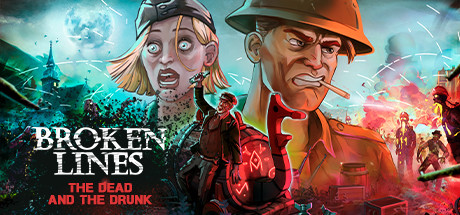
Type of publication: STEAM KEY / RUSSIA + WORLD
This edition has no regional restrictions and is activated in any country in the world
Game language: Russian (subtitles + interface) / English
Release date: February 25, 2020
Platform: Windows
Region: Region Free (any country, no restrictions)
Activation: Steam
=========================================
A plane with a detachment of soldiers crashes behind the front line in the heart of Eastern Europe. Left without communication with headquarters, the fighters must break through to the allies before they are broken by the horrors of war. To overcome all difficulties, you need to teach the soldiers to work in a team and carefully plan each step.
‘Dead as Hell’ is a free add-on for the tactical action game Broken Lines
The dead are rising from their graves! Crash landing behind enemy lines was a real challenge for our band of vagrants. And they certainly didn’t sign up for a mad fight for survival against both the living and the undead.
Now they have to find the source of this occult magic in a war-torn country and eliminate it before the zombie horde spreads across the world.
But how can they keep their sanity in a fight with enemies who have risen from the graves?
• The combat system is straight out of turn-based tactical RPGs with one important difference: your squad only follows commands during the action phase.
• The decisions you make will affect the development of the plot and lead to different endings.
• Tactical action.
‘Dead as Hell’ is a free add-on for the tactical action game Broken Lines
• It’s up to you to decide how to act. You can explore the battlefield and lure the undead horde into the enemy camp, and then finish off the survivors. Or you can get the biggest guns from your arsenal and douse everything that moves with fire!
• Occult secrets
• Mutant bosses
• Booze and weapons. The more your soldiers drink, the more perks and abilities they have
======================================
Activation
1. You need to download and install Steam http://steampowered.com/download/SteamInstall.msi (if not already installed)
2. Launch the Steam client
3. Create a new Steam account or log in to an existing one
4. Go to the "Games" section and select "Activate on Steam"
5. Enter the activation key you purchased
6. After that, the game will appear in your list of games and you can install it
This edition has no regional restrictions and is activated in any country in the world
Game language: Russian (subtitles + interface) / English
Release date: February 25, 2020
Platform: Windows
Region: Region Free (any country, no restrictions)
Activation: Steam
=========================================
A plane with a detachment of soldiers crashes behind the front line in the heart of Eastern Europe. Left without communication with headquarters, the fighters must break through to the allies before they are broken by the horrors of war. To overcome all difficulties, you need to teach the soldiers to work in a team and carefully plan each step.
‘Dead as Hell’ is a free add-on for the tactical action game Broken Lines
The dead are rising from their graves! Crash landing behind enemy lines was a real challenge for our band of vagrants. And they certainly didn’t sign up for a mad fight for survival against both the living and the undead.
Now they have to find the source of this occult magic in a war-torn country and eliminate it before the zombie horde spreads across the world.
But how can they keep their sanity in a fight with enemies who have risen from the graves?
• The combat system is straight out of turn-based tactical RPGs with one important difference: your squad only follows commands during the action phase.
• The decisions you make will affect the development of the plot and lead to different endings.
• Tactical action.
‘Dead as Hell’ is a free add-on for the tactical action game Broken Lines
• It’s up to you to decide how to act. You can explore the battlefield and lure the undead horde into the enemy camp, and then finish off the survivors. Or you can get the biggest guns from your arsenal and douse everything that moves with fire!
• Occult secrets
• Mutant bosses
• Booze and weapons. The more your soldiers drink, the more perks and abilities they have
======================================
Activation
1. You need to download and install Steam http://steampowered.com/download/SteamInstall.msi (if not already installed)
2. Launch the Steam client
3. Create a new Steam account or log in to an existing one
4. Go to the "Games" section and select "Activate on Steam"
5. Enter the activation key you purchased
6. After that, the game will appear in your list of games and you can install it
! Before buying, please check the system requirements of the game and other parameters that interest you (they may change with time). This can be done on the sites Steam / Uplay / Origin or the official website of the publisher. Goods purchased by mistake, as well as unsuitable for system requirements or region of activation, can not be returned and exchanged!
Dear customers! Convincing request, if there are any problems with the purchased goods, do not leave a negative feedback immediately. Write us a message in the correspondence (the purchase page on the site Oplata.info). We will try to respond to your message as soon as possible and promptly solve the problem. We draw to the fact that the basis for the exchange or return of the purchased key (key), which gives an error when activated, can only be VIDEO RECORD of the purchase process and subsequent attempt to activate it (mandatory condition - the record should not contain editing features).
Our entire range: https://boardrussia.ru/digital-shop/seller/467960
We will be grateful for every positive feedback you have left after the purchase. Sincerely, the project team "AlternativA".
Dear customers! Convincing request, if there are any problems with the purchased goods, do not leave a negative feedback immediately. Write us a message in the correspondence (the purchase page on the site Oplata.info). We will try to respond to your message as soon as possible and promptly solve the problem. We draw to the fact that the basis for the exchange or return of the purchased key (key), which gives an error when activated, can only be VIDEO RECORD of the purchase process and subsequent attempt to activate it (mandatory condition - the record should not contain editing features).
Our entire range: https://boardrussia.ru/digital-shop/seller/467960
We will be grateful for every positive feedback you have left after the purchase. Sincerely, the project team "AlternativA".
No feedback yet